> ## Documentation Index
> Fetch the complete documentation index at: https://developer.fin.com/llms.txt
> Use this file to discover all available pages before exploring further.
# Beneficiary Onboarding Guide
A beneficiary is a destination account (bank or e-wallet) that receives payouts on behalf of your customer. This guide walks you through onboarding a beneficiary using the latest API versions.
***
## Before You Start
| Prerequisite | Detail |
| ----------------- | --------------------------------------------------------- |
| Bearer token | Issued via `POST /v1/oauth/token` |
| Approved customer | Customer `customer_status` must be `APPROVED` |
| Reference data | Country, bank, and branch identifiers (covered in Step 1) |
***
## Onboarding Flow
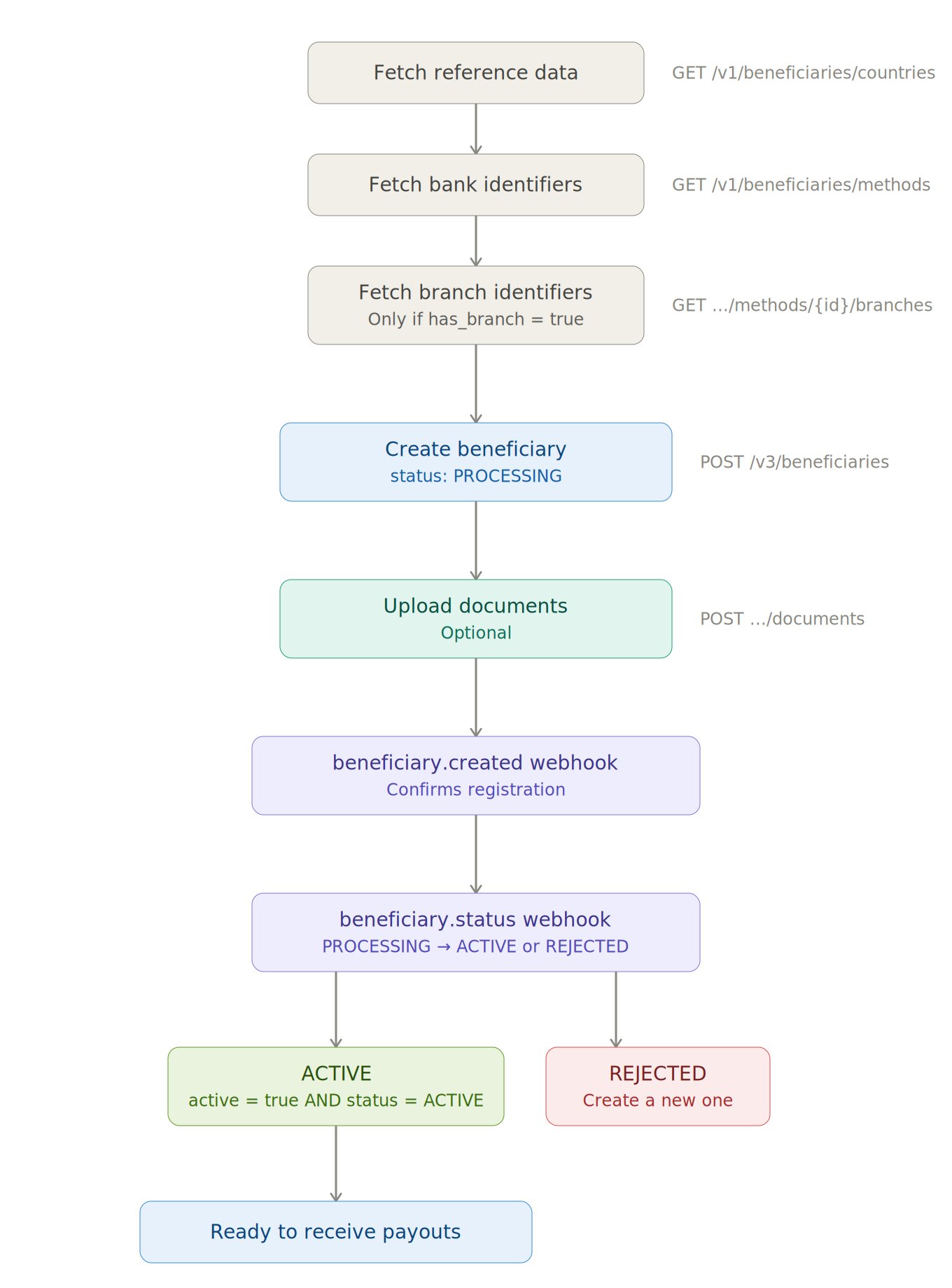 ***
## Step 1: Fetch Reference Data
Three catalogue endpoints feed into beneficiary creation. These are V1-only and no newer versions exist.
### 1a. List Supported Countries
```text theme={null}
GET /v1/beneficiaries/countries
```
Returns every payout-eligible country with supported methods and phone validation rules.
```json theme={null}
{
"data": [
{
"id": 4,
"code": "AUS",
"name": "Australia",
"currency_code": "AUD",
"phone": { "code": "+61", "min_length": 9, "max_length": 9 },
"available_methods": ["BANK"],
"flag": "https://flagcdn.com/au.svg"
}
]
}
```
**What you need from this:** `code` (ISO alpha-3) → maps to `country` and `currency` in the create call. `available_methods` tells you whether to build a bank form or e-wallet form.
### 1b. List Bank / E-Wallet Identifiers
```text theme={null}
GET /v1/beneficiaries/methods?method=BANK&scheme=LOCAL¤cy=BDT&country_code=BGD
```
| Parameter | Required | Values |
| -------------- | -------- | ----------------------------------- |
| `method` | Yes | `BANK` or `E_WALLET` |
| `scheme` | Yes | `LOCAL` or `SWIFT` |
| `currency` | Yes | Destination currency (from Step 1a) |
| `country_code` | Yes | ISO alpha-3 (from Step 1a) |
```json theme={null}
{
"data": [
{
"id": 160,
"name": "AB BANK",
"method": "BANK",
"has_branch": true
},
{
"id": 161,
"name": "EASTERN BANK LTD.",
"method": "BANK",
"has_branch": true
}
]
}
```
**What you need from this:** `id` → used as `bank_routing[].number` with scheme `BANK_IDENTIFIER`. Check `has_branch`. If `true`, proceed to 1c.
### 1c. List Branch Identifiers (conditional)
Only call this if `has_branch` is `true` from Step 1b.
```text theme={null}
GET /v1/beneficiaries/methods/{method_id}/branches
```
```json theme={null}
{
"data": [
{
"id": 21513,
"name": "BANANI",
"branch_code": "020157391"
}
]
}
```
**What you need from this:** `id` → used as `bank_routing[].number` with scheme `BRANCH_IDENTIFIER`.
***
## Step 2: Create the Beneficiary
```text theme={null}
POST /v3/beneficiaries
```
This is the primary creation endpoint. The payload has a fixed common section plus a polymorphic destination section (bank or e-wallet).
### Request Structure
```text theme={null}
{
// ── Common (always required) ──────────────────
customer_id // uuid, must be APPROVED
country // ISO alpha-3
currency // e.g. "BDT"
counter_party // "FIRST_PARTY" or "THIRD_PARTY"
account_holder // who gets paid (Individual or Business)
account_holder_address // their address
receiver_meta_data // purpose, relationship, nationality
developer_fee // your markup
deposit_instruction // how funds arrive (USDC / POLYGON)
refund_instruction // where refunds go
// ── Destination (one of) ──────────────────────
bank_account + bank_routing + bank_address // Bank path
e_wallet // E-Wallet path
// ── Optional ──────────────────────────────────
settlement_config // settlement method (true or false)
}
```
### Counter Party
The `counter_party` field declares the relationship between the customer and the beneficiary receiving the payout.
| Value | Meaning | Example |
| ------------- | ----------------------------------------------------------------------------------------- | ----------------------------------------------------------------------- |
| `FIRST_PARTY` | The customer is paying themselves. The beneficiary is the same entity as the customer. | A business withdrawing funds to its own bank account in another country |
| `THIRD_PARTY` | The customer is paying someone else. The beneficiary is a different individual or entity. | A business paying a supplier, employee, or freelancer |
This field is required in V3 and drives compliance screening. Third-party payouts may be subject to additional checks depending on the corridor.
### Account Holder
The `account_holder` object is polymorphic based on `type`.
**Individual:**
```json theme={null}
{
"type": "INDIVIDUAL",
"first_name": "John",
"last_name": "Doe",
"email": "john.doe@example.com",
"phone": "+8801912244626"
}
```
**Business:**
```json theme={null}
{
"type": "BUSINESS",
"business_name": "Fin.com",
"email": "contact@fin.com",
"phone": "+8801912244626"
}
```
### Account Holder Address
```json theme={null}
{
"account_holder_address": {
"street_line_1": "Road 11",
"city": "Dhaka",
"state": "BD-13",
"postcode": "1212",
"country": "BGD"
}
}
```
`state` uses ISO 3166-2 subdivision codes. Fetch valid values from `GET /v1/countries/{country_code}/subdivisions`.
### Receiver Metadata
```json theme={null}
{
"receiver_meta_data": {
"transaction_purpose_id": 1,
"transaction_purpose_remarks": null,
"occupation_id": 5,
"occupation_remarks": "Software Engineer",
"relationship": "FAMILY_MEMBER",
"relationship_remarks": "Family & Friends",
"nationality": "AUS",
"govt_id_number": "JG1121316A",
"govt_id_issue_date": "2024-12-30",
"govt_id_expire_date": "2027-12-30"
}
}
```
`transaction_purpose_id` → fetch from `GET /v1/transaction-purposes?type=INDIVIDUAL` or `?type=BUSINESS`. `occupation_id` → fetch from `GET /v1/occupations`.
**Relationship values by account holder type:**
Relationship enums varies by the sender and receiver types.
Lern more about [sender and beneficiary relationship](/receiver-relationship).
### Developer Fee
Your markup on each payout through this beneficiary.
```json theme={null}
{
"developer_fee": {
"fixed": 0.02,
"percentage": 0.01
}
}
```
Both components are applied: total fee = `fixed` + (`percentage` × payout amount).
### Deposit & Refund Instructions
**Deposit instruction** defines how source funds arrive:
```json theme={null}
{
"deposit_instruction": {
"currency": "USDC",
"rail": "POLYGON"
}
}
```
**Refund instruction** defines where failed payouts are returned:
```json theme={null}
{
"refund_instruction": {
"wallet_address": "0x1b577931C1cC2765024bFbafad97bCe14FF2e87F",
"currency": "USDC",
"rail": "POLYGON"
}
}
```
Only Polygon rail and USDC currency is available now. USDT is coming soon.
### Settlement Config (optional)
```json theme={null}
{
"settlement_config": {
"auto_settlement": true
}
}
```
Fin.com offers two settlement methods for payouts:
**Automatic settlement** (`auto_settlement: true`): Fin.com initiates the fiat payout automatically when crypto is received in the beneficiary's liquidation address.
**Programmatic settlement** (`auto_settlement: false`): You trigger the payout yourself using the [Settle a Transfer](https://developer.fin.com/api-reference/transactions/settle-a-transfer) endpoint or the [Execute Batch Transfer](https://developer.fin.com/api-reference/transactions/execute-batch-transfer) endpoint.
#### Programmatic settlement with prefunded balance
If you maintain prefunded balances with Fin.com, you must always trigger payouts programmatically. Use either the [Settle a Transfer](https://developer.fin.com/api-reference/transactions/settle-a-transfer) endpoint or the [Execute Batch Transfer](https://developer.fin.com/api-reference/transactions/execute-batch-transfer) endpoint. This applies regardless of the beneficiary's `auto_settlement` value (`true` or `false`).
#### Programmatic settlement without a prefunded balance
Set `auto_settlement` to `false` for the beneficiary. Fin.com will hold the crypto in the liquidation address until you trigger the payout using either the [Settle a Transfer](https://developer.fin.com/api-reference/transactions/settle-a-transfer) endpoint or the [Execute Batch Transfer](https://developer.fin.com/api-reference/transactions/execute-batch-transfer) endpoint.
Learn more about [Funding & Balances](/guides/funding-your-balance).
Pre-funding is required for all local currency payouts (e.g., BDT, INR, EUR).
***
### Destination: Bank Account
Add three fields: `bank_account`, `bank_routing`, and `bank_address`.
**bank\_account:**
```json theme={null}
{
"bank_account": {
"bank_name": "Eastern Bank Ltd.",
"number": "1234572211",
"scheme": "LOCAL",
"type": "SAVINGS"
}
}
```
| Field | Values |
| -------- | -------------------------------- |
| `scheme` | `LOCAL`, `SWIFT` |
| `type` | `CHECKING`, `SAVINGS`, `CURRENT` |
**bank\_routing:**
An array. Most corridors need multiple routing entries.
```json theme={null}
{
"bank_routing": [
{ "scheme": "SWIFT", "number": "CLNOUS66BRX" },
{ "scheme": "BANK_IDENTIFIER", "number": 160 },
{ "scheme": "BRANCH_IDENTIFIER", "number": 8 }
]
}
```
| Scheme | When to use |
| ------------------- | ------------------------------------------------------ |
| `SWIFT` | International transfers (BIC/SWIFT code) |
| `ACH` | US domestic ACH routing number |
| `WIRE` | US domestic Fedwire routing number |
| `IBAN` | Europe, Middle East (IBAN) |
| `BSB` | Australia (Bank/State/Branch code) |
| `IFSC` | India (IFSC code) |
| `BANK_IDENTIFIER` | Use `id` from `/v1/beneficiaries/methods` |
| `BRANCH_IDENTIFIER` | Use `id` from `/v1/beneficiaries/methods/:id/branches` |
| `BANK_CODE` | Country-specific bank code |
| `BRANCH_CODE` | Country-specific branch code |
| `TRANSIT_NUMBER` | Canada transit number |
**bank\_address:**
```json theme={null}
{
"bank_address": {
"street_line_1": "Ground Floor Tower 1, Road no 11",
"city": "Dhaka",
"state": "BD-13",
"postcode": "1212",
"country": "BGD"
}
}
```
***
### Destination: E-Wallet
Replace the three bank fields with a single `e_wallet` object.
```json theme={null}
{
"e_wallet": {
"scheme": "BKASH",
"number": "+8801688502814"
}
}
```
`scheme` values come from the `name` field in the [List Bank Identfier](https://developer.fin.com/api-reference/beneficiaries/list-bank-identifiers) response. Select `E_WALLET` in query parameter to get the list of E-Wallets.
***
### Response
```json theme={null}
{
"data": {
"beneficiary_id": "0254b433-e47d-412e-844b-b735c4bbba74"
}
}
```
Store this `beneficiary_id`. You'll need it for payouts, document uploads, and detail lookups.
***
### De-Duplication Rules
Fin rejects duplicate beneficiaries with a `409 Conflict`. Uniqueness is determined by:
| Destination | Fields checked |
| ----------- | --------------------------------------------------------------------------------------------- |
| Bank | `bank_account.scheme` + `bank_account.number` + `bank_routing.scheme` + `bank_routing.number` |
| E-Wallet | `e_wallet.scheme` + `e_wallet.number` |
The `409` response includes the existing `beneficiary_id` so you can reuse it instead of creating a new one.
***
### Country-Specific Validation
| Country | Rule |
| ------- | ---------------------------------------------------------------------------------- |
| GBR | Bank account number must match `^[0-9]{4,9}$` for both `LOCAL` and `SWIFT` schemes |
***
## Step 3: Upload Documents (Optional)
```text theme={null}
POST /v1/beneficiaries/{beneficiary_id}/documents
```
Multipart form-data. Use arbitrary field names. Allowed types: **PDF**, **JPG/JPEG**, **PNG**.
```json theme={null}
{
"data": {
"files": [
{ "invoice1": "/wKbvfH5E_Invoice.pdf" },
{ "invoice2": "/XUOdWacK_Invoice.jpg" }
]
}
}
```
The returned URIs can be attached to transfer payouts later via the `attachments` array in [Create a Transfer](https://developer.fin.com/api-reference/transactions/create-a-transfer) payload.
***
## Step 4: Verify & Confirm
### Fetch Beneficiary Details
```text theme={null}
GET /v3/beneficiaries/details?customer_id={id}&beneficiary_id={id}
```
Confirm the beneficiary was created correctly. The response includes the full record with all fields you submitted plus system-generated values.
Key fields to verify:
| Field | What to check |
| ----------------------------------------- | ------------------------------------------------------------------ |
| `active` | Boolean. Controlled by you via `PATCH /v1/beneficiaries`. |
| `status` | Enum. Controlled by Fin's internal validation. |
| `deposit_instruction.liquidation_address` | System-assigned. This is where you send USDC to trigger a payout. |
| `bank_routing[].name` | System-resolved bank/branch names from the identifiers you passed. |
### Eligibility for Transactions
A beneficiary can receive payouts **only** when both conditions are met:
| Field | Required value | Controlled by |
| -------- | -------------- | ----------------------------------- |
| `active` | `true` | You (via `PATCH /v1/beneficiaries`) |
| `status` | `ACTIVE` | Fin (system-managed) |
These are independent fields. `active` is your on/off switch. `status` reflects Fin's validation outcome.
**`status` values:**
| Status | Meaning |
| ------------ | -------------------------------------- |
| `PROCESSING` | Beneficiary is being validated by Fin |
| `ACTIVE` | Fin validation passed |
| `INACTIVE` | Fin has deactivated the beneficiary |
| `REJECTED` | Fin validation failed. Cannot be used. |
A newly created beneficiary starts in `PROCESSING` with `active = true`. Listen for the `beneficiary.status` webhook to know when Fin transitions it to `ACTIVE` or `REJECTED`.
***
## Managing Beneficiaries
### List All Beneficiaries for a Customer
```text theme={null}
GET /v1/customers/{customer_id}/beneficiaries
```
Returns all beneficiaries (active and inactive) for the given customer. Useful for building a beneficiary picker in your UI.
### Deactivate / Reactivate
```text theme={null}
PATCH /v1/beneficiaries
```
```json theme={null}
{
"beneficiary_id": "0254b433-e47d-412e-844b-b735c4bbba74",
"active": false
}
```
This endpoint toggles the `active` flag only. It does not change `status`. Setting `active: false` makes the beneficiary ineligible for payouts even if `status` is `ACTIVE`. Set `active: true` to re-enable.
> **Note:** If Fin has set `status` to `REJECTED` or `INACTIVE`, the beneficiary cannot transact regardless of the `active` flag. For `REJECTED` beneficiaries, create a new one instead.
***
## Webhooks
Subscribe to these events to track beneficiary lifecycle changes asynchronously.
| Event | Fires when |
| --------------------------------- | ----------------------------------------------- |
| `beneficiary.created` | A new beneficiary is created |
| `beneficiary.status` | A beneficiary's status changes |
| `beneficiary.liquidation.deposit` | USDC hits the beneficiary's liquidation address |
All webhook payloads include HMAC signatures for verification. Learn how to [verify webhook signatures](/guides/webhooks/verifying-webhooks).
### beneficiary.created
Triggered when a new beneficiary is created in the system. Use this to confirm the beneficiary was registered and to capture the `beneficiary_id` on your end.
```json theme={null}
{
"event": {
"id": "85804b3a-bf18-4d87-94f3-f7c45e66868e",
"type": "beneficiary.created",
"event_reference_id": "4d715f20-f704-45e0-af56-19ade318e852",
"created_at": "2025-12-10T10:36:18.279837Z",
"sandbox_mode": true
},
"data": {
"beneficiary_id": "4d715f20-f704-45e0-af56-19ade318e852",
"customer_id": "efb54adf-b7f4-4716-80e3-806e11f20b7b",
"type": "INDIVIDUAL",
"active": true
}
}
```
At this point the beneficiary's `status` is `PROCESSING`. Wait for the `beneficiary.status` webhook before attempting any payouts.
### beneficiary.status
Triggered when a beneficiary's status changes. This is the primary webhook you should listen for to know when a beneficiary is ready to receive payments.
**Status values:**
| Status | Meaning |
| ------------ | ----------------------------------------------------- |
| `PROCESSING` | Beneficiary creation is in progress |
| `ACTIVE` | Beneficiary is verified and ready to receive payments |
| `INACTIVE` | Beneficiary has been deactivated |
| `REJECTED` | Beneficiary was rejected during verification |
**Common transitions:**
| From | To | What it means |
| ------------ | ---------- | ---------------------------------------------- |
| `PROCESSING` | `ACTIVE` | Verification passed. You can now send payouts. |
| `PROCESSING` | `REJECTED` | Verification failed. Create a new beneficiary. |
| `ACTIVE` | `INACTIVE` | Beneficiary deactivated by Fin. |
### beneficiary.liquidation.deposit
Fires when any transfer hits the liquidation address. Useful for confirming funds arrival before payout execution.
```json theme={null}
{
"data": {
"beneficiary_id": "5b4ea7ee-9d40-44b3-b857-dd5a890b9313",
"customer_id": "bea5a6c1-0611-44c6-8c29-a6608e76916c",
"amount": 3,
"liquidation_address": "0xade8141fd1aef58dc0a5365a32a6cfe95904c08f",
"txn_hash": "0x7808238a69057600f0c8e291ffbfde87a74fb81b32fc583231352147770e2751",
"type": "INDIVIDUAL",
"active": true
}
}
```
***
## Error Reference
| Status | Cause | Action |
| ------ | ----------------------- | --------------------------------------------------------- |
| `400` | Field validation failed | Check `errors` array for field-level details |
| `401` | Invalid / expired token | Re-authenticate via `POST /v1/oauth/token` |
| `409` | Duplicate beneficiary | Use the returned `beneficiary_id` from the error response |
| `422` | Request format error | Check required fields and data types |
***
## V3 vs V2: Key Differences
### Create Beneficiary
| Aspect | V2 (`POST /v2/beneficiaries`) | V3 (`POST /v3/beneficiaries`) |
| -------------------------------------------- | --------------------------------- | --------------------------------------- |
| `customer_id` format | Free string (e.g., `cust_123456`) | UUID (strict) |
| `counter_party` | Not supported | Required. `FIRST_PARTY` / `THIRD_PARTY` |
| `occupation_remarks` in `receiver_meta_data` | Required | Optional |
| Response body | `{ data: { id, status } }` | `{ data: { beneficiary_id } }` |
| Response code | `200` | `200` |
### Fetch Beneficiary Details
| Aspect | V2 (`GET /v2/beneficiaries/details`) | V3 (`GET /v3/beneficiaries/details`) |
| ----------------------- | ------------------------------------ | ------------------------------------------------- |
| `status` field | Not present | `PROCESSING` / `ACTIVE` / `INACTIVE` / `REJECTED` |
| `counter_party` field | Not present | Present |
| `bank_routing[].number` | Not returned (only `name`) | Returned alongside `name` |
**Recommendation:** Use V3 for all new integrations. V2 remains available but lacks counter-party tracking and the explicit status field.
***
## What's Next
With the beneficiary onboarded, you can:
* **Send USDC to the beneficiary liquidation address**
* **Send a single payout** → `POST /v1/transactions/transfer-payout` , if the settlement\_config is false.
* **Send batch payouts** → `POST /v1/batch/transactions/commit` , if the settlement\_config is false.
* **Preview fees** → `POST /v1/fee-calculation` (pass `beneficiary_id` for developer-fee-aware calculations)
* **Check FX rates** → `GET /v1/fx-rate?currency_code={code}`
***
## Step 1: Fetch Reference Data
Three catalogue endpoints feed into beneficiary creation. These are V1-only and no newer versions exist.
### 1a. List Supported Countries
```text theme={null}
GET /v1/beneficiaries/countries
```
Returns every payout-eligible country with supported methods and phone validation rules.
```json theme={null}
{
"data": [
{
"id": 4,
"code": "AUS",
"name": "Australia",
"currency_code": "AUD",
"phone": { "code": "+61", "min_length": 9, "max_length": 9 },
"available_methods": ["BANK"],
"flag": "https://flagcdn.com/au.svg"
}
]
}
```
**What you need from this:** `code` (ISO alpha-3) → maps to `country` and `currency` in the create call. `available_methods` tells you whether to build a bank form or e-wallet form.
### 1b. List Bank / E-Wallet Identifiers
```text theme={null}
GET /v1/beneficiaries/methods?method=BANK&scheme=LOCAL¤cy=BDT&country_code=BGD
```
| Parameter | Required | Values |
| -------------- | -------- | ----------------------------------- |
| `method` | Yes | `BANK` or `E_WALLET` |
| `scheme` | Yes | `LOCAL` or `SWIFT` |
| `currency` | Yes | Destination currency (from Step 1a) |
| `country_code` | Yes | ISO alpha-3 (from Step 1a) |
```json theme={null}
{
"data": [
{
"id": 160,
"name": "AB BANK",
"method": "BANK",
"has_branch": true
},
{
"id": 161,
"name": "EASTERN BANK LTD.",
"method": "BANK",
"has_branch": true
}
]
}
```
**What you need from this:** `id` → used as `bank_routing[].number` with scheme `BANK_IDENTIFIER`. Check `has_branch`. If `true`, proceed to 1c.
### 1c. List Branch Identifiers (conditional)
Only call this if `has_branch` is `true` from Step 1b.
```text theme={null}
GET /v1/beneficiaries/methods/{method_id}/branches
```
```json theme={null}
{
"data": [
{
"id": 21513,
"name": "BANANI",
"branch_code": "020157391"
}
]
}
```
**What you need from this:** `id` → used as `bank_routing[].number` with scheme `BRANCH_IDENTIFIER`.
***
## Step 2: Create the Beneficiary
```text theme={null}
POST /v3/beneficiaries
```
This is the primary creation endpoint. The payload has a fixed common section plus a polymorphic destination section (bank or e-wallet).
### Request Structure
```text theme={null}
{
// ── Common (always required) ──────────────────
customer_id // uuid, must be APPROVED
country // ISO alpha-3
currency // e.g. "BDT"
counter_party // "FIRST_PARTY" or "THIRD_PARTY"
account_holder // who gets paid (Individual or Business)
account_holder_address // their address
receiver_meta_data // purpose, relationship, nationality
developer_fee // your markup
deposit_instruction // how funds arrive (USDC / POLYGON)
refund_instruction // where refunds go
// ── Destination (one of) ──────────────────────
bank_account + bank_routing + bank_address // Bank path
e_wallet // E-Wallet path
// ── Optional ──────────────────────────────────
settlement_config // settlement method (true or false)
}
```
### Counter Party
The `counter_party` field declares the relationship between the customer and the beneficiary receiving the payout.
| Value | Meaning | Example |
| ------------- | ----------------------------------------------------------------------------------------- | ----------------------------------------------------------------------- |
| `FIRST_PARTY` | The customer is paying themselves. The beneficiary is the same entity as the customer. | A business withdrawing funds to its own bank account in another country |
| `THIRD_PARTY` | The customer is paying someone else. The beneficiary is a different individual or entity. | A business paying a supplier, employee, or freelancer |
This field is required in V3 and drives compliance screening. Third-party payouts may be subject to additional checks depending on the corridor.
### Account Holder
The `account_holder` object is polymorphic based on `type`.
**Individual:**
```json theme={null}
{
"type": "INDIVIDUAL",
"first_name": "John",
"last_name": "Doe",
"email": "john.doe@example.com",
"phone": "+8801912244626"
}
```
**Business:**
```json theme={null}
{
"type": "BUSINESS",
"business_name": "Fin.com",
"email": "contact@fin.com",
"phone": "+8801912244626"
}
```
### Account Holder Address
```json theme={null}
{
"account_holder_address": {
"street_line_1": "Road 11",
"city": "Dhaka",
"state": "BD-13",
"postcode": "1212",
"country": "BGD"
}
}
```
`state` uses ISO 3166-2 subdivision codes. Fetch valid values from `GET /v1/countries/{country_code}/subdivisions`.
### Receiver Metadata
```json theme={null}
{
"receiver_meta_data": {
"transaction_purpose_id": 1,
"transaction_purpose_remarks": null,
"occupation_id": 5,
"occupation_remarks": "Software Engineer",
"relationship": "FAMILY_MEMBER",
"relationship_remarks": "Family & Friends",
"nationality": "AUS",
"govt_id_number": "JG1121316A",
"govt_id_issue_date": "2024-12-30",
"govt_id_expire_date": "2027-12-30"
}
}
```
`transaction_purpose_id` → fetch from `GET /v1/transaction-purposes?type=INDIVIDUAL` or `?type=BUSINESS`. `occupation_id` → fetch from `GET /v1/occupations`.
**Relationship values by account holder type:**
Relationship enums varies by the sender and receiver types.
Lern more about [sender and beneficiary relationship](/receiver-relationship).
### Developer Fee
Your markup on each payout through this beneficiary.
```json theme={null}
{
"developer_fee": {
"fixed": 0.02,
"percentage": 0.01
}
}
```
Both components are applied: total fee = `fixed` + (`percentage` × payout amount).
### Deposit & Refund Instructions
**Deposit instruction** defines how source funds arrive:
```json theme={null}
{
"deposit_instruction": {
"currency": "USDC",
"rail": "POLYGON"
}
}
```
**Refund instruction** defines where failed payouts are returned:
```json theme={null}
{
"refund_instruction": {
"wallet_address": "0x1b577931C1cC2765024bFbafad97bCe14FF2e87F",
"currency": "USDC",
"rail": "POLYGON"
}
}
```
Only Polygon rail and USDC currency is available now. USDT is coming soon.
### Settlement Config (optional)
```json theme={null}
{
"settlement_config": {
"auto_settlement": true
}
}
```
Fin.com offers two settlement methods for payouts:
**Automatic settlement** (`auto_settlement: true`): Fin.com initiates the fiat payout automatically when crypto is received in the beneficiary's liquidation address.
**Programmatic settlement** (`auto_settlement: false`): You trigger the payout yourself using the [Settle a Transfer](https://developer.fin.com/api-reference/transactions/settle-a-transfer) endpoint or the [Execute Batch Transfer](https://developer.fin.com/api-reference/transactions/execute-batch-transfer) endpoint.
#### Programmatic settlement with prefunded balance
If you maintain prefunded balances with Fin.com, you must always trigger payouts programmatically. Use either the [Settle a Transfer](https://developer.fin.com/api-reference/transactions/settle-a-transfer) endpoint or the [Execute Batch Transfer](https://developer.fin.com/api-reference/transactions/execute-batch-transfer) endpoint. This applies regardless of the beneficiary's `auto_settlement` value (`true` or `false`).
#### Programmatic settlement without a prefunded balance
Set `auto_settlement` to `false` for the beneficiary. Fin.com will hold the crypto in the liquidation address until you trigger the payout using either the [Settle a Transfer](https://developer.fin.com/api-reference/transactions/settle-a-transfer) endpoint or the [Execute Batch Transfer](https://developer.fin.com/api-reference/transactions/execute-batch-transfer) endpoint.
Learn more about [Funding & Balances](/guides/funding-your-balance).
Pre-funding is required for all local currency payouts (e.g., BDT, INR, EUR).
***
### Destination: Bank Account
Add three fields: `bank_account`, `bank_routing`, and `bank_address`.
**bank\_account:**
```json theme={null}
{
"bank_account": {
"bank_name": "Eastern Bank Ltd.",
"number": "1234572211",
"scheme": "LOCAL",
"type": "SAVINGS"
}
}
```
| Field | Values |
| -------- | -------------------------------- |
| `scheme` | `LOCAL`, `SWIFT` |
| `type` | `CHECKING`, `SAVINGS`, `CURRENT` |
**bank\_routing:**
An array. Most corridors need multiple routing entries.
```json theme={null}
{
"bank_routing": [
{ "scheme": "SWIFT", "number": "CLNOUS66BRX" },
{ "scheme": "BANK_IDENTIFIER", "number": 160 },
{ "scheme": "BRANCH_IDENTIFIER", "number": 8 }
]
}
```
| Scheme | When to use |
| ------------------- | ------------------------------------------------------ |
| `SWIFT` | International transfers (BIC/SWIFT code) |
| `ACH` | US domestic ACH routing number |
| `WIRE` | US domestic Fedwire routing number |
| `IBAN` | Europe, Middle East (IBAN) |
| `BSB` | Australia (Bank/State/Branch code) |
| `IFSC` | India (IFSC code) |
| `BANK_IDENTIFIER` | Use `id` from `/v1/beneficiaries/methods` |
| `BRANCH_IDENTIFIER` | Use `id` from `/v1/beneficiaries/methods/:id/branches` |
| `BANK_CODE` | Country-specific bank code |
| `BRANCH_CODE` | Country-specific branch code |
| `TRANSIT_NUMBER` | Canada transit number |
**bank\_address:**
```json theme={null}
{
"bank_address": {
"street_line_1": "Ground Floor Tower 1, Road no 11",
"city": "Dhaka",
"state": "BD-13",
"postcode": "1212",
"country": "BGD"
}
}
```
***
### Destination: E-Wallet
Replace the three bank fields with a single `e_wallet` object.
```json theme={null}
{
"e_wallet": {
"scheme": "BKASH",
"number": "+8801688502814"
}
}
```
`scheme` values come from the `name` field in the [List Bank Identfier](https://developer.fin.com/api-reference/beneficiaries/list-bank-identifiers) response. Select `E_WALLET` in query parameter to get the list of E-Wallets.
***
### Response
```json theme={null}
{
"data": {
"beneficiary_id": "0254b433-e47d-412e-844b-b735c4bbba74"
}
}
```
Store this `beneficiary_id`. You'll need it for payouts, document uploads, and detail lookups.
***
### De-Duplication Rules
Fin rejects duplicate beneficiaries with a `409 Conflict`. Uniqueness is determined by:
| Destination | Fields checked |
| ----------- | --------------------------------------------------------------------------------------------- |
| Bank | `bank_account.scheme` + `bank_account.number` + `bank_routing.scheme` + `bank_routing.number` |
| E-Wallet | `e_wallet.scheme` + `e_wallet.number` |
The `409` response includes the existing `beneficiary_id` so you can reuse it instead of creating a new one.
***
### Country-Specific Validation
| Country | Rule |
| ------- | ---------------------------------------------------------------------------------- |
| GBR | Bank account number must match `^[0-9]{4,9}$` for both `LOCAL` and `SWIFT` schemes |
***
## Step 3: Upload Documents (Optional)
```text theme={null}
POST /v1/beneficiaries/{beneficiary_id}/documents
```
Multipart form-data. Use arbitrary field names. Allowed types: **PDF**, **JPG/JPEG**, **PNG**.
```json theme={null}
{
"data": {
"files": [
{ "invoice1": "/wKbvfH5E_Invoice.pdf" },
{ "invoice2": "/XUOdWacK_Invoice.jpg" }
]
}
}
```
The returned URIs can be attached to transfer payouts later via the `attachments` array in [Create a Transfer](https://developer.fin.com/api-reference/transactions/create-a-transfer) payload.
***
## Step 4: Verify & Confirm
### Fetch Beneficiary Details
```text theme={null}
GET /v3/beneficiaries/details?customer_id={id}&beneficiary_id={id}
```
Confirm the beneficiary was created correctly. The response includes the full record with all fields you submitted plus system-generated values.
Key fields to verify:
| Field | What to check |
| ----------------------------------------- | ------------------------------------------------------------------ |
| `active` | Boolean. Controlled by you via `PATCH /v1/beneficiaries`. |
| `status` | Enum. Controlled by Fin's internal validation. |
| `deposit_instruction.liquidation_address` | System-assigned. This is where you send USDC to trigger a payout. |
| `bank_routing[].name` | System-resolved bank/branch names from the identifiers you passed. |
### Eligibility for Transactions
A beneficiary can receive payouts **only** when both conditions are met:
| Field | Required value | Controlled by |
| -------- | -------------- | ----------------------------------- |
| `active` | `true` | You (via `PATCH /v1/beneficiaries`) |
| `status` | `ACTIVE` | Fin (system-managed) |
These are independent fields. `active` is your on/off switch. `status` reflects Fin's validation outcome.
**`status` values:**
| Status | Meaning |
| ------------ | -------------------------------------- |
| `PROCESSING` | Beneficiary is being validated by Fin |
| `ACTIVE` | Fin validation passed |
| `INACTIVE` | Fin has deactivated the beneficiary |
| `REJECTED` | Fin validation failed. Cannot be used. |
A newly created beneficiary starts in `PROCESSING` with `active = true`. Listen for the `beneficiary.status` webhook to know when Fin transitions it to `ACTIVE` or `REJECTED`.
***
## Managing Beneficiaries
### List All Beneficiaries for a Customer
```text theme={null}
GET /v1/customers/{customer_id}/beneficiaries
```
Returns all beneficiaries (active and inactive) for the given customer. Useful for building a beneficiary picker in your UI.
### Deactivate / Reactivate
```text theme={null}
PATCH /v1/beneficiaries
```
```json theme={null}
{
"beneficiary_id": "0254b433-e47d-412e-844b-b735c4bbba74",
"active": false
}
```
This endpoint toggles the `active` flag only. It does not change `status`. Setting `active: false` makes the beneficiary ineligible for payouts even if `status` is `ACTIVE`. Set `active: true` to re-enable.
> **Note:** If Fin has set `status` to `REJECTED` or `INACTIVE`, the beneficiary cannot transact regardless of the `active` flag. For `REJECTED` beneficiaries, create a new one instead.
***
## Webhooks
Subscribe to these events to track beneficiary lifecycle changes asynchronously.
| Event | Fires when |
| --------------------------------- | ----------------------------------------------- |
| `beneficiary.created` | A new beneficiary is created |
| `beneficiary.status` | A beneficiary's status changes |
| `beneficiary.liquidation.deposit` | USDC hits the beneficiary's liquidation address |
All webhook payloads include HMAC signatures for verification. Learn how to [verify webhook signatures](/guides/webhooks/verifying-webhooks).
### beneficiary.created
Triggered when a new beneficiary is created in the system. Use this to confirm the beneficiary was registered and to capture the `beneficiary_id` on your end.
```json theme={null}
{
"event": {
"id": "85804b3a-bf18-4d87-94f3-f7c45e66868e",
"type": "beneficiary.created",
"event_reference_id": "4d715f20-f704-45e0-af56-19ade318e852",
"created_at": "2025-12-10T10:36:18.279837Z",
"sandbox_mode": true
},
"data": {
"beneficiary_id": "4d715f20-f704-45e0-af56-19ade318e852",
"customer_id": "efb54adf-b7f4-4716-80e3-806e11f20b7b",
"type": "INDIVIDUAL",
"active": true
}
}
```
At this point the beneficiary's `status` is `PROCESSING`. Wait for the `beneficiary.status` webhook before attempting any payouts.
### beneficiary.status
Triggered when a beneficiary's status changes. This is the primary webhook you should listen for to know when a beneficiary is ready to receive payments.
**Status values:**
| Status | Meaning |
| ------------ | ----------------------------------------------------- |
| `PROCESSING` | Beneficiary creation is in progress |
| `ACTIVE` | Beneficiary is verified and ready to receive payments |
| `INACTIVE` | Beneficiary has been deactivated |
| `REJECTED` | Beneficiary was rejected during verification |
**Common transitions:**
| From | To | What it means |
| ------------ | ---------- | ---------------------------------------------- |
| `PROCESSING` | `ACTIVE` | Verification passed. You can now send payouts. |
| `PROCESSING` | `REJECTED` | Verification failed. Create a new beneficiary. |
| `ACTIVE` | `INACTIVE` | Beneficiary deactivated by Fin. |
### beneficiary.liquidation.deposit
Fires when any transfer hits the liquidation address. Useful for confirming funds arrival before payout execution.
```json theme={null}
{
"data": {
"beneficiary_id": "5b4ea7ee-9d40-44b3-b857-dd5a890b9313",
"customer_id": "bea5a6c1-0611-44c6-8c29-a6608e76916c",
"amount": 3,
"liquidation_address": "0xade8141fd1aef58dc0a5365a32a6cfe95904c08f",
"txn_hash": "0x7808238a69057600f0c8e291ffbfde87a74fb81b32fc583231352147770e2751",
"type": "INDIVIDUAL",
"active": true
}
}
```
***
## Error Reference
| Status | Cause | Action |
| ------ | ----------------------- | --------------------------------------------------------- |
| `400` | Field validation failed | Check `errors` array for field-level details |
| `401` | Invalid / expired token | Re-authenticate via `POST /v1/oauth/token` |
| `409` | Duplicate beneficiary | Use the returned `beneficiary_id` from the error response |
| `422` | Request format error | Check required fields and data types |
***
## V3 vs V2: Key Differences
### Create Beneficiary
| Aspect | V2 (`POST /v2/beneficiaries`) | V3 (`POST /v3/beneficiaries`) |
| -------------------------------------------- | --------------------------------- | --------------------------------------- |
| `customer_id` format | Free string (e.g., `cust_123456`) | UUID (strict) |
| `counter_party` | Not supported | Required. `FIRST_PARTY` / `THIRD_PARTY` |
| `occupation_remarks` in `receiver_meta_data` | Required | Optional |
| Response body | `{ data: { id, status } }` | `{ data: { beneficiary_id } }` |
| Response code | `200` | `200` |
### Fetch Beneficiary Details
| Aspect | V2 (`GET /v2/beneficiaries/details`) | V3 (`GET /v3/beneficiaries/details`) |
| ----------------------- | ------------------------------------ | ------------------------------------------------- |
| `status` field | Not present | `PROCESSING` / `ACTIVE` / `INACTIVE` / `REJECTED` |
| `counter_party` field | Not present | Present |
| `bank_routing[].number` | Not returned (only `name`) | Returned alongside `name` |
**Recommendation:** Use V3 for all new integrations. V2 remains available but lacks counter-party tracking and the explicit status field.
***
## What's Next
With the beneficiary onboarded, you can:
* **Send USDC to the beneficiary liquidation address**
* **Send a single payout** → `POST /v1/transactions/transfer-payout` , if the settlement\_config is false.
* **Send batch payouts** → `POST /v1/batch/transactions/commit` , if the settlement\_config is false.
* **Preview fees** → `POST /v1/fee-calculation` (pass `beneficiary_id` for developer-fee-aware calculations)
* **Check FX rates** → `GET /v1/fx-rate?currency_code={code}`