Virtual accounts are available in the following currencies and payment rails, subject to the risk classification of the customer’s country of residence:
Why am I getting 'unsupported beneficiary currency and scheme combination' when initiating a USD payout?
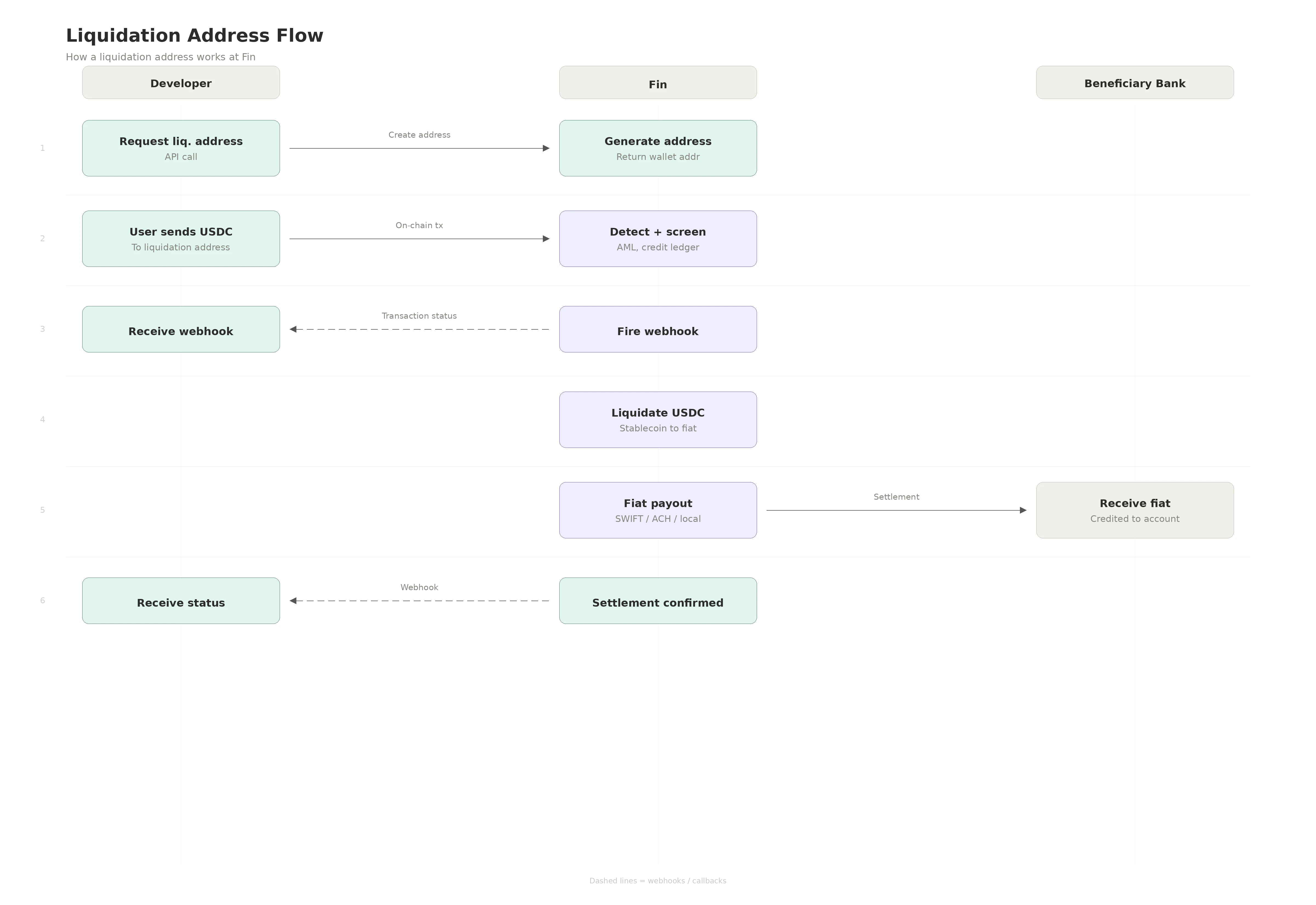
While the beneficiary was created successfully, you should have also received a liquidation_address in the response.For USD payouts, the Transfer API and Batch API are not applicable for local routes. If the beneficiary has auto_settlement: false with country USA and currency USD, using those APIs will result in this error. The Transfer/Batch APIs can only be used for USD SWIFT in specific cases where Fin maintains an underlying prefunding with the banking partner.All USD local payouts must go through the liquidation_address. You need to send USDC on Polygon (the currently supported currency and rail, with more being added) to the liquidation_address. This automatically triggers a liquidation address drain, which initiates a payout to the end bank account.You will also receive a transaction.status webhook when funds are received by Fin at the liquidation address.
⌘I
Assistant
Responses are generated using AI and may contain mistakes.