

Payment Sources
Fin currently supports three deposit sources, with more on the way.Use Cases
1. Prediction Market Deposits
A prediction market platform wants to let users deposit funds directly from their exchange accounts or external wallets. What the user does:- Opens the deposit flow on the platform
- Selects Bybit Pay, Kraken Pay, or pays from an external wallet
- Confirms the transaction
- Platform calls the Quote Estimation API to get the conversion rate and fees for the deposit amount.
- User confirms. Platform calls the Create Order API to initiate the transaction.
- For exchange pay (Bybit/Kraken): user scans a QR code to authorize payment from their exchange account. For external wallets: user sends to a provided deposit address.
- Fin receives the funds, deducts the platform fee, and credits the destination wallet.
- Platform calls Get Payment Details API to confirm settlement and update the user’s balance.
- Pay with USDC → receive USDC on Solana, Base, or Ethereum
- Pay with USDC → receive USDC on Polygon
- Additional tokens and chains can be added based on platform requirements
2. Multi-Chain Wallet Top-Ups
A platform wants to let users top up their account balance with a range of tokens across different chains. What the user does:- Initiates a deposit on the platform
- Chooses their preferred token and payment method
- Sends funds from any external wallet
- Quote Estimation API returns the rate, fee, and expected delivery amount for the selected token pair.
- Create Order API generates the deposit address or QR code.
- User sends funds. Fin receives the deposit, handles any conversion, deducts the fee, and delivers to the destination wallet.
- Get Payment Details API confirms the transaction status.
- Bitcoin on the Bitcoin network
- ETH on Ethereum
- USDT on Tron
- USDC on Solana, Base, Ethereum
3. Cross-Token Deposits
A platform accepts a specific token (e.g., PYUSD), but users hold a different token (e.g., USDT on Bybit). What the user does:- Initiates a deposit
- Pays with USDT from Bybit Pay
- Receives PYUSD in their platform wallet
- Quote Estimation API returns the USDT → PYUSD conversion rate and fees.
- Create Order API initiates the order and generates the Bybit Pay QR code.
- User scans the QR code. USDT is deducted from their Bybit Pay account.
- Fin converts USDT to PYUSD, deducts the fee, and deposits PYUSD into the user’s platform wallet.
- Get Payment Details API confirms delivery.
API Overview
Supported Assets
This is not an exhaustive list. Fin can add support for additional tokens and chains based on platform requirements.
How Fees Work
Fin deducts a platform-defined fee from each transaction before delivering funds to the destination wallet. The fee is surfaced to the user upfront via the Quote Estimation API — no hidden costs.Integration Flow for receiving payments
Flow of APIs for Crypto transfer to external wallets:
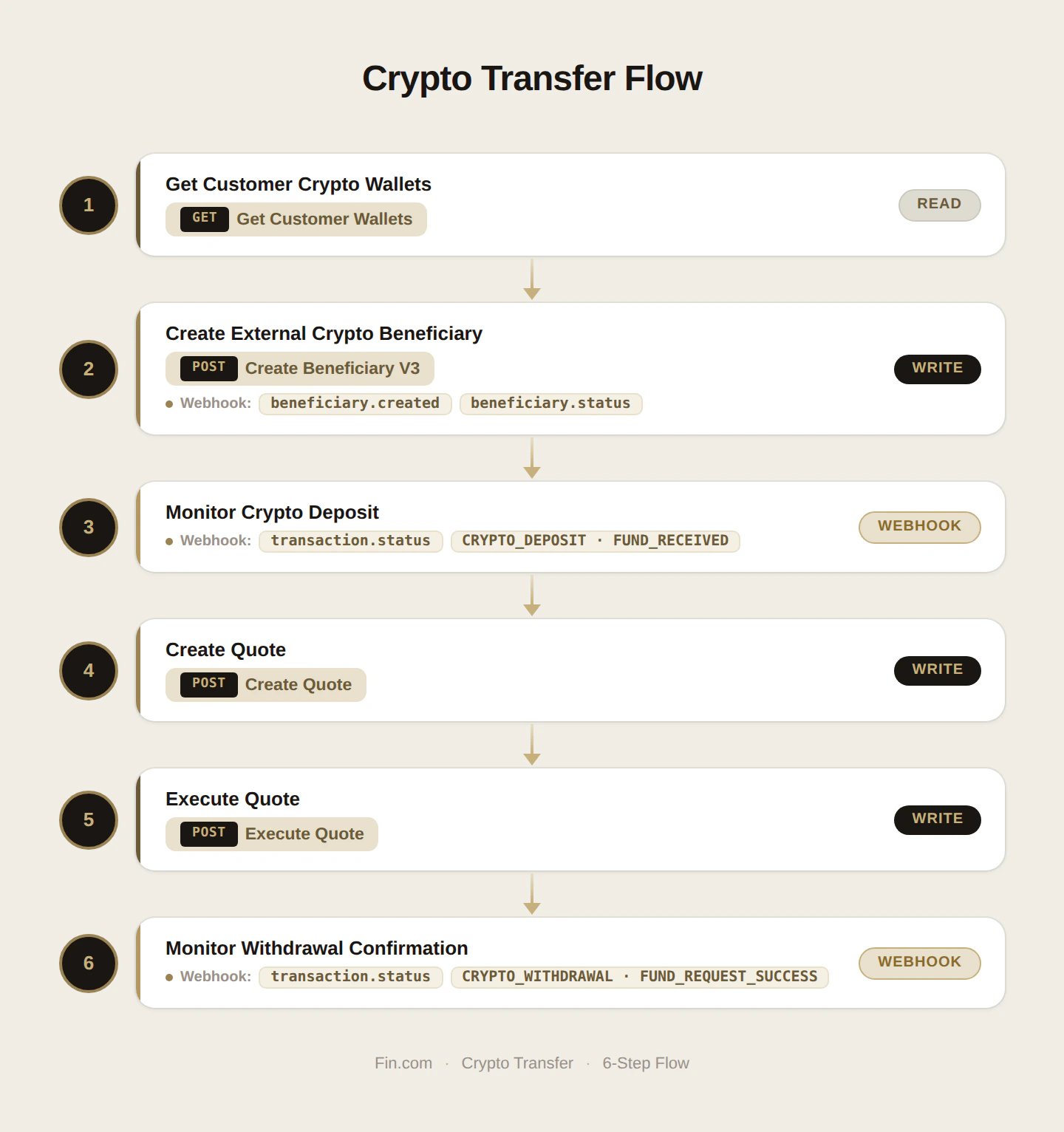
Step 1: Get crypto wallets for a given customer
- Call the Get Customer Details API to get the wallet addresses assigned to the customer along with their balances.
- Fin provisions wallets for the following chains: Polygon, Ethereum, and Solana. (Save wallet IDs to use in quote later)
- You will receive crypto in these wallets from the external sources.
Step 2: Create an external crypto wallet to withdraw crypto from Fin wallets
- Call the Create beneficiary V3 endpoint with the fields required for external crypto. (Save beneficiary ID to use in quote later)
- Follow the exact payload structure given in the request example.
- Monitor webhook for beneficiary approval (beneficiary.created, beneficiary.status). It’s almost instant.
- You can check beneficiary details using Fetch beneficiary details V2
Step 3: Monitor crypto deposit in the Fin issues wallet
- Webhook event to monitor:
transaction.status- TransactionType:
CRYPTO_DEPOSIT - Status:
FUND_RECEIVED
- TransactionType:
Step 4: Create a quote to get a quote estimation
- Call the Create quote with
beneficiary_idandcrypto_wallet_id. - You will get a quote estimation and expiry time
Step 5: Execute the quote before it expires
- Call Execute quote with the
quote_idfrom the former response
Step 6: Monitor the webhook for withdrawal confirmation
- Webhook event to monitor:
transaction.status- TransactionType:
CRYPTO_WITHDRAWAL - Status:
FUND_REQUEST_SUCCESS
- TransactionType: