

Prerequisites
* Required field Before you begin, ensure you have:- API credentials: Client ID and secret from the API Keys section
- Access token: Generated via POST /v1/oauth/token
- Reference data: Familiarity with GET /v1/purposes, GET /v1/source-of-funds, and GET /v1/source-of-wealth endpoints
Onboarding Steps
Request Body Structure
Verification Type (Optional)
Verification type determines how customer identity is validated.STANDARD uses traditional document verification (default). RELIANCE leverages third-party KYB data when enabled for your client.
verification_type field is optional and defaults to STANDARD if omitted.
Industry Codes (Required)
NAICS 2022 6-digit industry codes describing the business. Minimum 1 item required.
Get the full list of industry codes here.
Basic Information (Required)
Company details exactly as shown on incorporation documents. All fields must use only English (Latin) characters.
Tax Info object (
tax_info[]):
Valid Entity Types:
Example:
Financial Profile (Required)
Describes account purpose, transaction volumes, and fund sources. Use reference endpoints to fetch valid integer IDs.purpose_id, source_of_fund_ids, and source_of_wealth_ids are integer foreign keys — not string enums. Always fetch valid IDs from the reference endpoints before submitting. Use source_of_funds_description (not sof_remarks) for additional context on source of funds. Enter all amounts in whole USD dollars — 50000 = $50,000, not cents.purpose_id: 3 = Cross-border payments, source_of_fund_ids: [13, 16] = IDs from the source-of-funds catalogue, estimated_annual_revenue_usd: 5000000 = $5,000,000 USD (integer, not cents).
Addresses (Required)
Registered and operational addresses for the business.
Address object:
Example:
Associated Parties (Minimum 1 Required)
Each business customer must have at least one associated party. At least one party must hold bothshareholder and ubo roles simultaneously. A single person can hold both roles.
Each associated party must include:
basic_info:
address: Residential address using the same Address object structure as business addresses.
roles (required):
ownership_info (required when roles includes ubo):
Example:
Holding Structure (Optional)
For businesses with corporate shareholders or foreign branches.
Corporate Shareholder object:
Foreign Branch object:
Example:
Public Listings (Optional)
For publicly traded companies.
Example:
Compliance (Optional)
For regulated businesses, MSBs, and high-risk industries.
Risk Profile (
risk_profile):
Valid
high_risk_activities values: adult_entertainment, crypto_exchange, gambling, cannabis, weapons, money_services, cross_border_payments
Regulated Activity (regulated_activity):
AML (
aml):
Customer Risk Split object (
customer_risk_split):
Represents how your customer base is distributed across risk tiers. These percentages reflect what proportion of your customers you classify as low, medium, or high risk based on your own due diligence process.
Percentages must sum to 100.
Verification Method object (used by
customer_identity_verification, pep_and_sanctions_screening, transaction_monitoring):
Example:
Metadata (Optional)
Client-defined reference for internal tracking:Document Upload & Attachment
After creating the business customer, upload and attach verification documents.Step 1: Upload Documents
Upload files usingmultipart/form-data:
Step 2: Attach Business Documents
Link formation, ownership, and supporting documents to the business customer:The
tos_policies_value should be parsed from the tos_policies_url query parameter returned when creating the customer. Providing this value signifies that the customer was shown the terms and accepted them.Step 3: Attach Associated Party Documents
Attach identity and address documents for each associated party:The
associated_party_id is returned in the GET /v2/customers/:customer-id response after creating the business customer.
Address Document Types:
Customer Status & Webhooks
After document submission, customers go through a verification workflow: Status Lifecycle: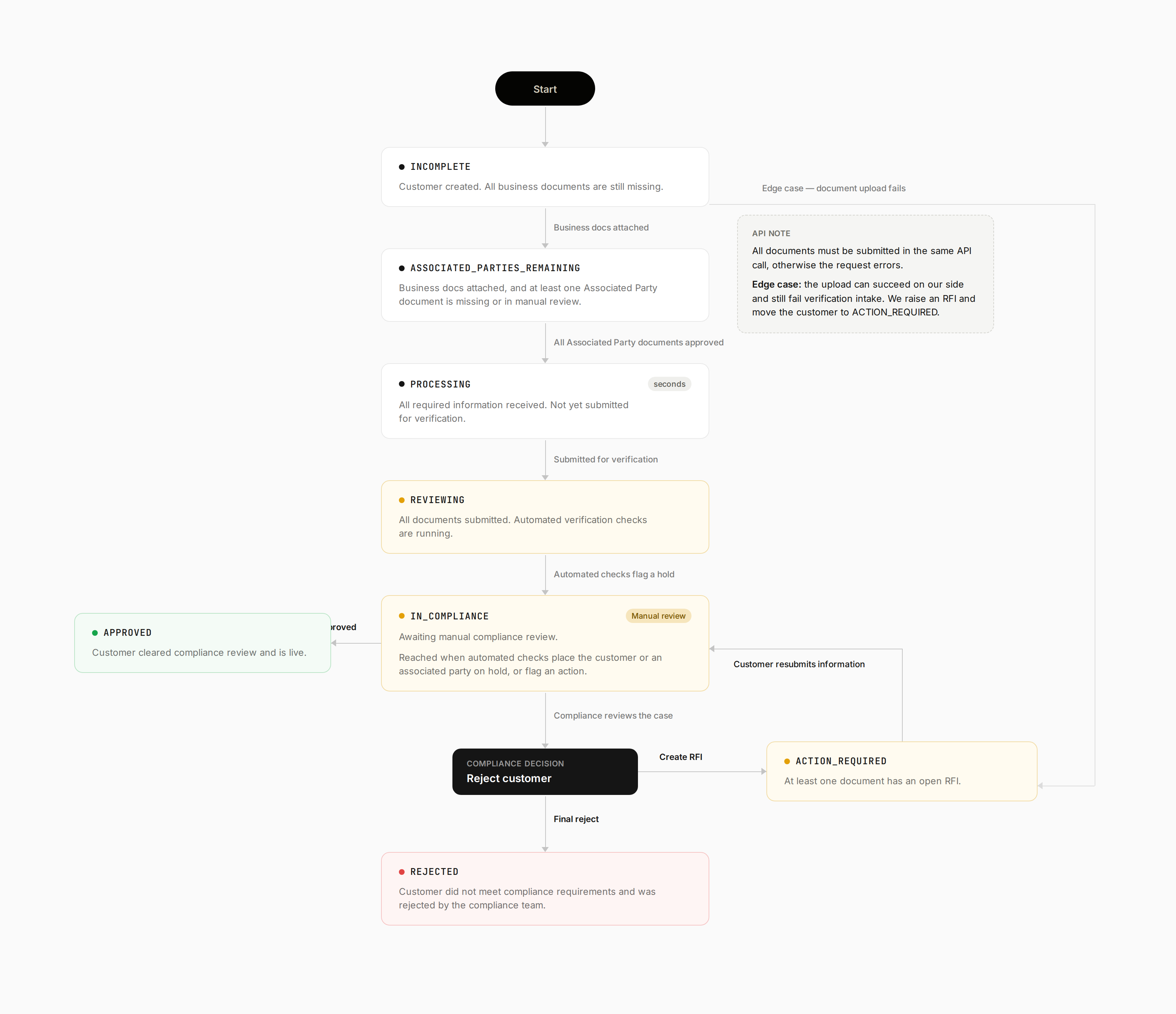
Subscribe to webhooks to automate your onboarding flow. See Verifying Webhooks for setup.
Error Response Examples
Email validation error (not lowercase):What’s Next?
1. Monitor Verification Status
- Subscribe to
customer.created,customer.status, andcustomer.rfiwebhooks - Handle status transitions:
INCOMPLETE→PROCESSING→REVIEWING→APPROVED - For
ACTION_REQUIREDstatus (triggered bycustomer.rfi), respond with the requested documents - See Webhook Verification for implementation details
2. Test Edge Cases
- ✓ Email with uppercase characters
- ✓ Ownership percentages totaling > 100%
- ✓ Non-Latin characters in text fields
- ✓ Missing required fields
- ✓ RELIANCE verification when not enabled
- ✓ P.O. Box addresses
3. Production Checklist
- Implemented webhook handling for status updates
- Added proper error handling for all failure scenarios
- Client-side validation for email lowercase
- Fetched and cached reference data (purposes, source-of-funds, source-of-wealth)
- Implemented document upload UI/flow
- Reviewed High-Risk Business Activities
- Set up monitoring for failed verifications
- Tested the complete workflow end-to-end
4. Create Beneficiaries
Once your business customer is approved, you can create beneficiaries for payouts:Common Pitfalls & Solutions
Last updated: April 2026 — Reflects V2 API (
POST /v2/customers/business)