

Prerequisites
Before you begin, ensure you have:- API credentials: Client ID and secret from the API Keys section
- Access token: Generated via POST /v1/oauth/token
- Catalogue data: Familiarity with /v1/occupations, /v1/purposes, and /v1/source-of-funds endpoints
Onboarding Steps
Request Body Structure
Verification Type (Required)
Verification type determines how customer identity is validated. STANDARD uses traditional document verification. On RELIANCE, Fin.com relies on your KYC. Please contact our compliance team to know more.
Basic Information (Required)
Personal details exactly as shown on identity documents. All fields must use only English (Latin) characters. If any field contains non-ASCII characters, provide a transliterated value in the corresponding _en field.
Fields:
Tax Info Array
Each entry intax_info must have a unique document_id.
V2 Change:
tax_info replaces tin. V1 used a single tin string field. V2 uses a tax_info array, which supports multiple tax documents across different countries.Address (Required)
Current residential address of the customer. TheFields:countryfield must matchbasic_info.country_of_residence.
Example:
Financial Profile (Required)
Describes employment status, occupation, transaction purpose, volume, and fund sources. Use catalogue endpoints to fetch valid IDs.Fields:
When fetching catalogue data for individual customers, use the
?type=INDIVIDUAL query parameter to get the correct options for purpose_id and source_of_fund_ids.Metadata (Optional)
Custom key-value pairs for internal tracking:Document Upload & Attachment
After creating the individual customer, you must upload and attach verification documents.Step 1: Upload Documents
Upload files using multipart/form-data:Step 2: Attach Documents
In V2, thecustomer_id moves to the URL path. The request body uses identifying_documents and address_documents arrays instead of V1’s proof_of_identity and proof_of_address objects.
- The customer must be in
INCOMPLETEorACTION_REQUIREDstatus. Only one attach request can be in flight per customer. A second concurrent request returns409. - The
tos_policies_valueshould be parsed from thetos_policies_urlquery parameter returned when creating the customer. Providing this value signifies that the customer was shown the terms and accepted them.
Identity Document Types & Side Requirements
At most one non-SELFIE identity document may be included per request. A
SELFIE entry may be required depending on your client configuration. When required, include exactly one SELFIE entry with at least one file.Address Proof Types
Exactly one
address_documents entry is required. The country on the address document must match the customer’s country_of_residence.
Key Rules
- File URIs must be unique across the entire reques and must belong to this customer.
expiry_dateis required for all identity document types exceptSELFIEand must be in the future.
Customer Status & Webhooks
After document submission, customers go through a verification workflow: Status Lifecycle: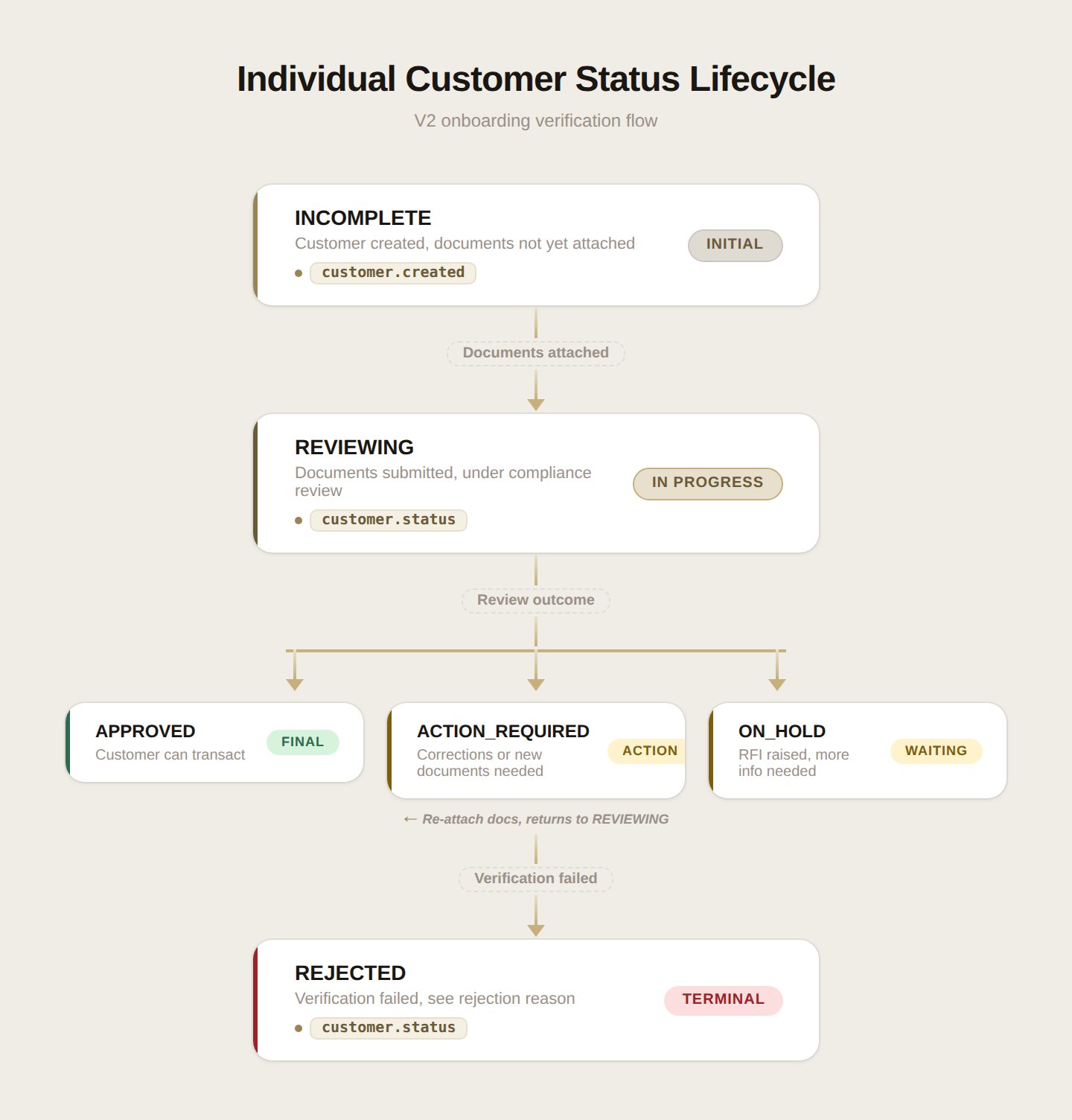
Webhook Events:
customer.created- Fired when a customer is createdcustomer.status- Fired when status changes
Error Response Examples
Email validation error (not lowercase):What’s Next?
You’ve successfully created an individual customer using V2. Here’s what to do next:1. Monitor Verification Status
Listen for webhook events to track verification progress:- Subscribe to
customer.createdandcustomer.statuswebhooks - Handle status transitions:
INCOMPLETE→REVIEWING→APPROVED - For
ACTION_REQUIREDstatuses, re-submit corrected documents via the attach endpoint - For
ON_HOLDstatuses, respond to RFIs (Requests for Information) via email or Slack with additional documents - See Webhook Verification for implementation details
2. Test Edge Cases
Validate your integration handles common errors:- ✓ Email with uppercase characters
- ✓
address.countrynot matchingcountry_of_residence - ✓ Non-ASCII characters without
_entransliteration fields - ✓ Missing required fields
- ✓ RELIANCE verification when not enabled
- ✓ Concurrent attach requests (409)
- ✓ Expired identity documents
- ✓ Duplicate file URIs across documents
3. Production Checklist
Before going live, ensure you have:- Implemented webhook handling for status updates
- Added proper error handling for all failure scenarios (400, 401, 403, 409, 422)
- Client-side validation for email lowercase and tax document format
- Fetched and cached catalogue data (occupations, purposes, source-of-funds)
- Implemented document upload UI/flow including selfie capture
- Set up monitoring for failed verifications
- Tested the complete workflow end-to-end