

Create a customer, get them approved, turn on USD, and issue a virtual account. This guide walks you through onboarding a customer all the way to a USD virtual account: creating the customer, getting them approved, enabling USD, and issuing the account. It also sets expectations on timelines and what can go wrong. You move through three parties: you (the developer), Fin, and the banking partner. You trigger each step with an API call. Fin and the banking partner each run their own review.Documentation Index
Fetch the complete documentation index at: https://developer.fin.com/llms.txt
Use this file to discover all available pages before exploring further.
Always use the latest version of an endpoint. Where both a V1 and a V2 exist, use V2. If you already integrated an older version, migrate to V2.
The flow at a glance
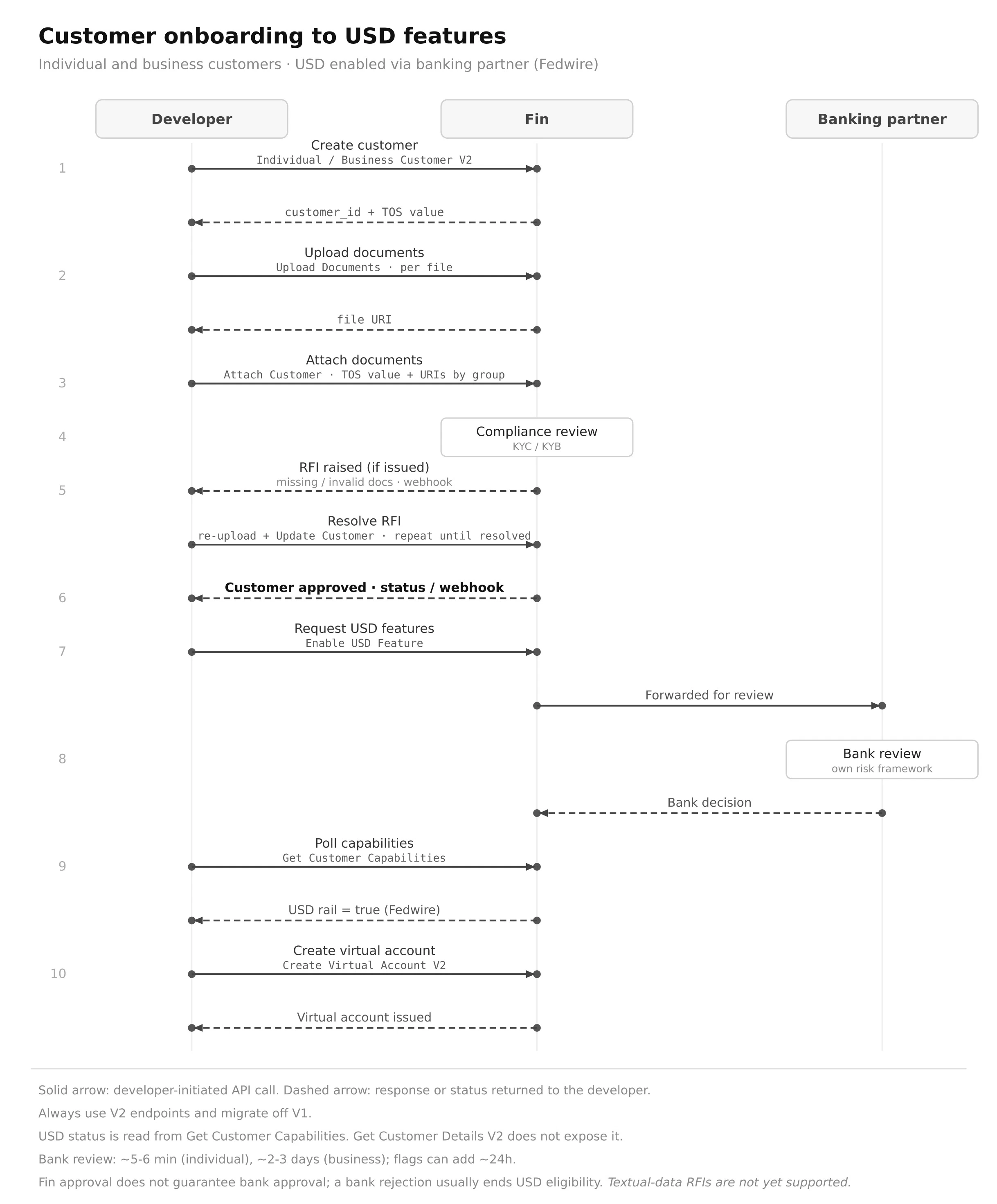
Step by step
Create the customer
Call Create Individual Customer for an individual, or Create Business Customer V2 for a business.Send only textual information here: legal name, financial profile, estimated annual revenue, website, and so on. Do not send documents in this call.The response returns the
customer_id and a TOS value (the terms of service policies URL). Keep both. You need the TOS value in step 3.Upload documents
Call Upload Documents once per file. You can name each file however you like.Each call returns a file URI. Save these for the next step. Check the document guide for which documents each entity type requires.
Attach documents to the customer
Call Attach Customer. Pass two things:
- The TOS value from step 1. This confirms the customer accepted Fin’s terms.
- The file URIs from step 2, placed in the correct document groups for the entity type. Document groups depend on the entity. An LLC, for example, needs registration documents, constitutional documents, and evidence of directors and controllers.
Wait for compliance review
Fin reviews the customer (KYC for individuals, KYB for businesses).Subscribe to webhooks to track progress. You get events for customer created, status changes, and RFIs.
Respond to any RFIs
If Fin needs more information, you receive an RFI webhook describing what is required and for which section.To respond: upload the corrected file with Upload Documents, then submit it with Update Customer. Do not re-run Attach Customer. The RFI object tells you how to construct the update. Repeat until every RFI is cleared.Today, RFIs cover documents only. Textual-data RFIs are coming soon.
Customer approved ✅
When Fin approves the customer, you see it on the status webhook or by checking customer status.Approval does not mean the customer has a virtual account yet, and it does not guarantee the banking partner will approve. See what to expect.
Request USD features
Call Enable USD Feature. Fin forwards the request to the banking partner for review.USD is never turned on automatically. You have to request it.
We are working on removing this requirement. We updated once it’s removed.
Banking partner review
The banking partner reviews the customer against its own risk framework.Typical timelines: about 5 to 6 minutes for an individual, about 2 to 3 days for a business. If the bank flags something or raises its own RFI, expect up to 24 hours.
Confirm USD is enabled
Poll Get Customer Capabilities. USD is live when the on-ramp and off-ramp USD rail returns
true (rail: Fedwire).Use Get Customer Capabilities for this. Get Customer Details V2 does not expose capabilities.What to expect
A USD virtual account is not instant after approval. You must call Enable USD Feature, then the banking partner reviews before the account is issued.
FAQ
Which create endpoint do I use?
Which create endpoint do I use?
Use Create Individual Customer for individuals and Create Business Customer V2 for businesses. Always use the latest version, and migrate off any older version you already integrated.
Do I upload documents in the create call?
Do I upload documents in the create call?
No. The create call takes textual information only. Upload files with Upload Documents, then link them with Attach Customer.
Where do I get the TOS value?
Where do I get the TOS value?
It is returned by the create call, inside the terms of service policies URL. Pass it in Attach Customer to confirm the customer accepted Fin’s terms.
How do I respond to an RFI?
How do I respond to an RFI?
Upload the corrected file with Upload Documents, then submit it with Update Customer. Do not re-run Attach Customer. Repeat until all RFIs are cleared. RFIs currently cover documents only.
How long does approval take?
How long does approval take?
After Fin approves and you request USD, the banking partner review usually takes about 5 to 6 minutes for an individual and about 2 to 3 days for a business. Flags or a bank RFI can add up to 24 hours.
My customer is approved but has no virtual account. Why?
My customer is approved but has no virtual account. Why?
Approval does not issue an account on its own. Call Enable USD Feature to request USD, wait for the banking partner review, then create the account with Create Virtual Account V2 once capabilities show
true.How do I know USD is enabled?
How do I know USD is enabled?
Call Get Customer Capabilities. USD is enabled when the on-ramp and off-ramp USD rail returns
true example: (rail: Fedwire, ACH, SWIFT).Why not just use Get Customer Details V2 for status?
Why not just use Get Customer Details V2 for status?
Get Customer Details V2 does not return capabilities. For USD status, use Get Customer Capabilities.
Does Fin approval guarantee the bank will approve?
Does Fin approval guarantee the bank will approve?
No. The banking partner runs its own risk framework and can reject a customer Fin approved. A bank rejection usually ends USD eligibility for that customer.